
Reviews (19)
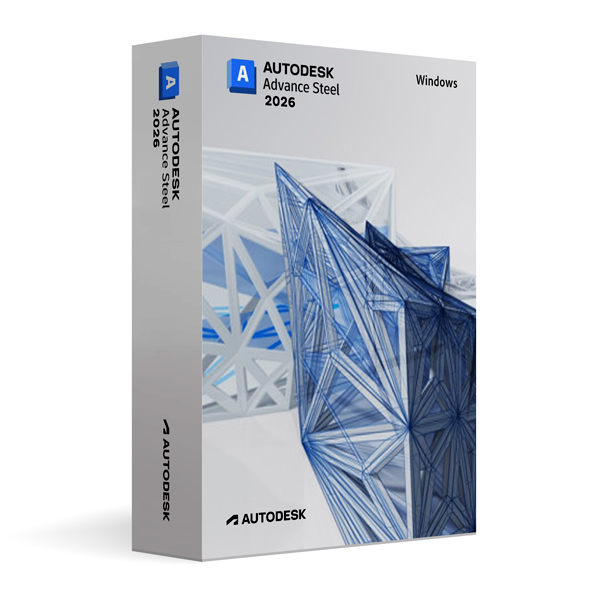
Autodesk Advance Steel 2026 for Windows
On Offer • Selling Fast£89.99

LIFELONG 24/7 SUPPORT FROM REAL EXPERTS – INCLUDED AT NO EXTRA COST

100% Buyer Protection
Payments protected by Stripe fraud prevention.

Instant Delivery
Automatic email delivery right after payment.

Free Expert Support
Help with setup, activation, and troubleshooting.

Original License
Genuine license securely linked to your account.

Secure Payments
SSL-encrypted payments via trusted providers.

Invoice Available
Download your invoice after purchase.
This edition of Autodesk is licensed for personal and non-commercial purposes under an educational license. It offers the exact same features and performance as the commercial version, produces identical output without watermarks, and ensures full professional-grade functionality.
Overview
Autodesk Advance Steel 2026 for Windows is a specialized 3D modeling and detailing software designed for structural steel engineers, fabricators, and detailers. Built on the familiar AutoCAD platform, it delivers powerful tools for creating precise steel structures, generating detailed fabrication drawings, and automating manufacturing outputs. Whether you are working on industrial facilities, commercial buildings, or complex infrastructure projects, Advance Steel 2026 streamlines the design-to-fabrication workflow, reducing errors and improving productivity.
Comprehensive Structural Steel Tools
Advance Steel 2026 offers a rich library of parametric steel connections, customizable profiles, and intelligent modeling tools that adapt to your specific project needs. The software automates the creation of fabrication drawings, BOMs (Bills of Materials), and NC (Numerical Control) files for CNC machines, ensuring that your designs transition smoothly from the digital model to physical production. Integrated clash detection and model validation features help identify and resolve issues early, reducing costly rework during fabrication or construction.
What’s New in Advance Steel 2026
The 2026 version introduces faster model regeneration, enhanced parametric connection tools, and improved interoperability with Revit and other BIM platforms. Enhanced drawing style configurations allow for greater customization, while updated automation scripts enable more efficient creation of shop drawings. Improved DWG compatibility and better integration with cloud collaboration tools ensure smoother coordination between design teams, fabricators, and project stakeholders.
Seamless Integration with BIM Workflows
Advance Steel 2026 integrates tightly with Autodesk Revit and other BIM tools, enabling a connected workflow from architectural design to steel detailing and fabrication. Using the built-in Steel Connections for Revit extension, engineers can synchronize models and data between platforms, ensuring that design intent is preserved throughout the project lifecycle. This interoperability streamlines coordination across disciplines and reduces data loss during handovers.
Automation & Productivity
Automation is at the core of Advance Steel 2026, with features like automated part numbering, dimensioning, and drawing generation. The intelligent modeling environment supports dynamic modifications, meaning any change to the model automatically updates all associated drawings and schedules. The inclusion of customizable templates and drawing styles allows teams to maintain consistent documentation standards across multiple projects.
Performance & Customization
Optimized for large and complex structural projects, Advance Steel 2026 delivers faster performance, improved stability, and better memory management. Users can customize the interface, create macros, and use AutoLISP or .NET API for advanced automation and integration with other systems. These customization options make it adaptable for both small detailing firms and large engineering enterprises.
System Requirements
Autodesk Advance Steel 2026 for Windows requires Windows 10 or Windows 11 (64-bit) and a multi-core Intel or AMD processor. A minimum of 16 GB RAM is recommended (32 GB for large projects), with a DirectX 12 compatible graphics card featuring at least 4 GB VRAM. Installation requires approximately 15 GB of free disk space, plus additional storage for project files.
Simple Activation
When you purchase Advance Steel 2026 for Windows, you will receive the official Autodesk installer, a detailed setup guide, and activation via your Autodesk account—no license key is required. Once activated, you will have lifetime access for personal and educational use under the educational license terms.
Why Choose Advance Steel 2026 for Windows
Advance Steel is trusted worldwide for delivering accurate, efficient, and constructible steel detailing. The 2026 release builds on this reputation with faster workflows, better interoperability, and enhanced automation tools that save time and reduce errors. Whether detailing beams, columns, trusses, or custom steel structures, Advance Steel 2026 gives you the precision and flexibility needed to succeed in competitive fabrication environments.
Detail with Confidence
Order Autodesk Advance Steel 2026 for Windows today and take your steel detailing capabilities to the next level. Download instantly, activate securely, and start producing accurate, fabrication-ready steel models and documentation with industry-leading software.
Related products
-
Microsoft Windows 10 Home
£19.99 -

Microsoft Windows 11 Home
£19.99




Scarlett K. –
I’m really happy with the outcome. Everything was fast, clear, and easy.
Jessica F. –
The ordering process was simple and easy to follow. I received everything I needed right away, and activation worked without any issues. I really liked how transparent the instructions were. Overall, a very smooth and trustworthy experience.
Rachel H. –
The process was simple and easy to follow. Everything was finished quickly.
Chloe B. –
What impressed me the most was how quickly everything was handled. The setup was smooth, and everything worked flawlessly on the first try. I had no doubts throughout the process as everything was clearly explained. Highly recommend this service.
Callum T. –
The process wasn’t confusing, just required attention. If you rush through it, you might get stuck.
Connor W. –
It worked once I followed the instructions properly.
Hiba C. –
Instructions were mostly clear, though I had to reread one section. Once that was sorted, the rest went through properly.
Sienna C. –
Instructions were clear enough.
Timothy P. –
Very reliable and easy to use. The process was simple and activation happened almost instantly. I didn’t need to reach out for help because everything was well laid out. It’s rare to have such a smooth experience, and I’m very pleased.
Keira P. –
I wouldn’t describe the setup as intuitive, but it wasn’t confusing either. It just required patience and actually reading what was on screen.
Michael H. –
I wouldn’t rush to recommend it based on setup alone, but I also can’t fault it for failing.
Harry B. –
I had to wait during part of the process, which made me unsure, but it completed normally.
Owen T. –
Worked first time, so can’t complain.
Skye P. –
Simple steps, easy to follow.
Hugo P. –
Decent and straightforward.
Ahmed B. –
No errors or warnings showed up, which was good.
Emma B. –
Not much to say really. Downloaded it, installed it, and it worked. Nothing exciting, but no problems either.
Mohammed B. –
Took a bit of time, but no issues.
Yusuf H. –
Nothing fancy, but it worked.